Configuration
SW setup
- Download QGroundControl
- Connect the Pixhawk to your computer with a USB cable and run QGroundControl
- Update the firmware of the Pixhawk. If the Pixhawk is intended for just manual flying without the MRS UAV System, use the newest PX4 release available. If the UAV uses the MRS System (there is an onboard computer) you have to use our Firmware, which you can find here: PX4 firmware
- If you are loading a custom FW, in QGroundControl you need to select Advanced settings -> custom firmware file.. while loading the firmware.
- Once successfully flashed, we can continue to the rest of the setup.
Airframe tab
- For most drones, select Generic Quadcopter, or Hexa/Octa if applicable. Hit Apply and Restart (top right of the GUI)
Sensors tab
- Calibrate all the Sensors which are shown as red to continue the setup. Follow the instructions in QgroundControl.
- You have to recalibrate the sensors outside before the first flight.
Radio tab
- First, we have to bind the radio receiver to the transmitter and setup the RC channels.
- The RC channels have to correspond to this table:
| Channel | Function | Description |
|---|---|---|
| 1 | Roll | manual control input |
| 2 | Throttle | manual control input |
| 3 | Pitch | manual control input |
| 4 | Yaw | manual control input |
| 5 | Offboard switch | Used to switch the drone in and out of Offboard mode |
| 6 | Flight mode switch | Changes the PX4 flight mode when you fly manually |
| 7 | MRS system switch | Switch used to trigger some functionality of the MRS UAV system, like the "remote" mode |
| 8 | MRS emergency switch | Do not configure any functionality for Ch8 in QGroundControl, it is handled by the MRS system internally. Triggers an emergency behaviour (e-hover, e-land, failsafe land) according to MRS UAV system configuration |
-
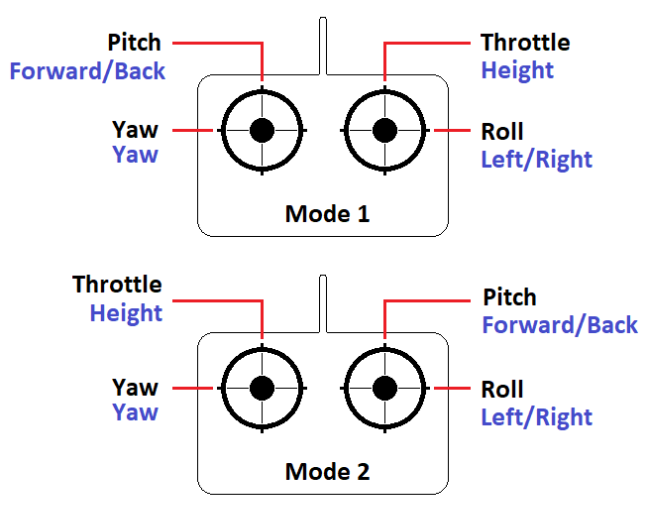
These are the stick inputs, most clients use Mode 2, MRS members use Mode 1. Switch the channels in the RC controller to correspond.
-
The channels 5-8 are used to change the flight modes and command the MRS system. They should be bound to the switches according to this image:
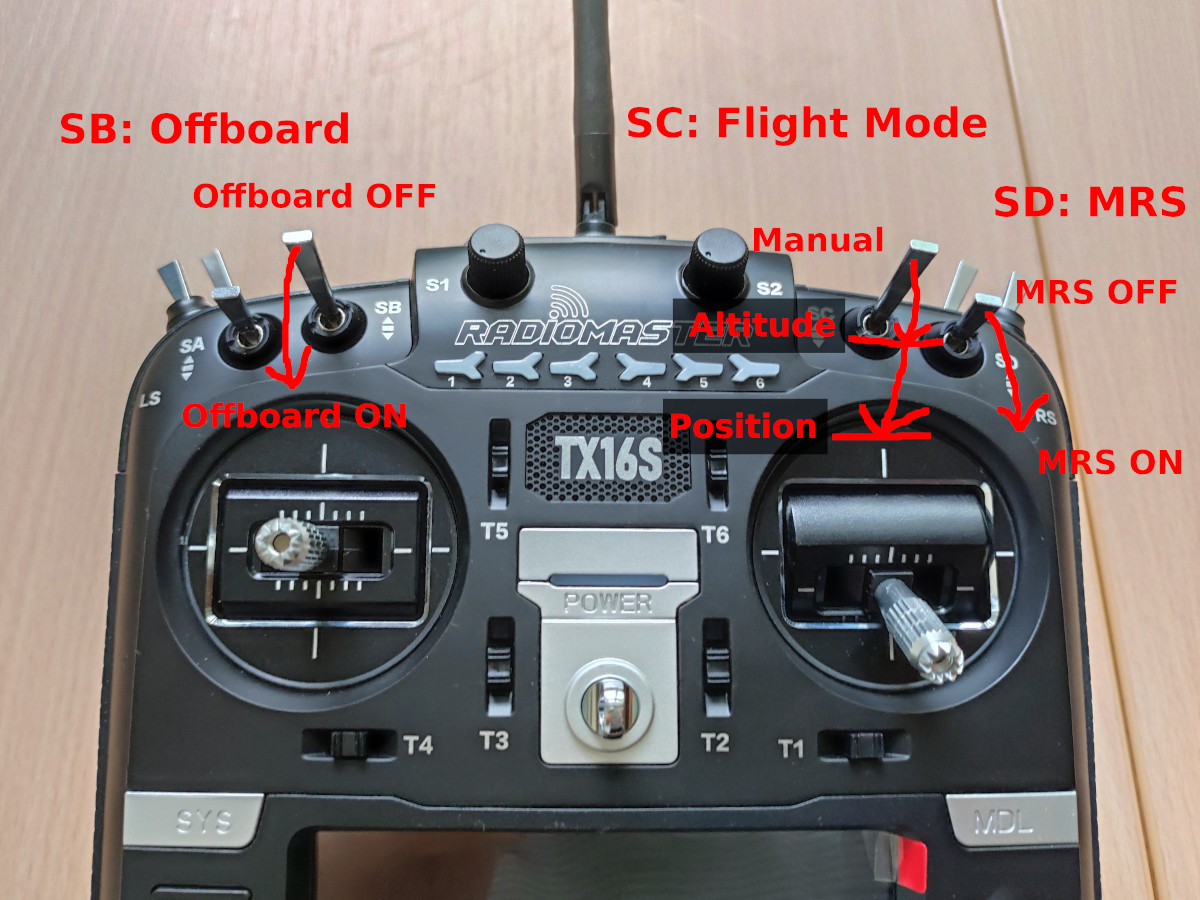
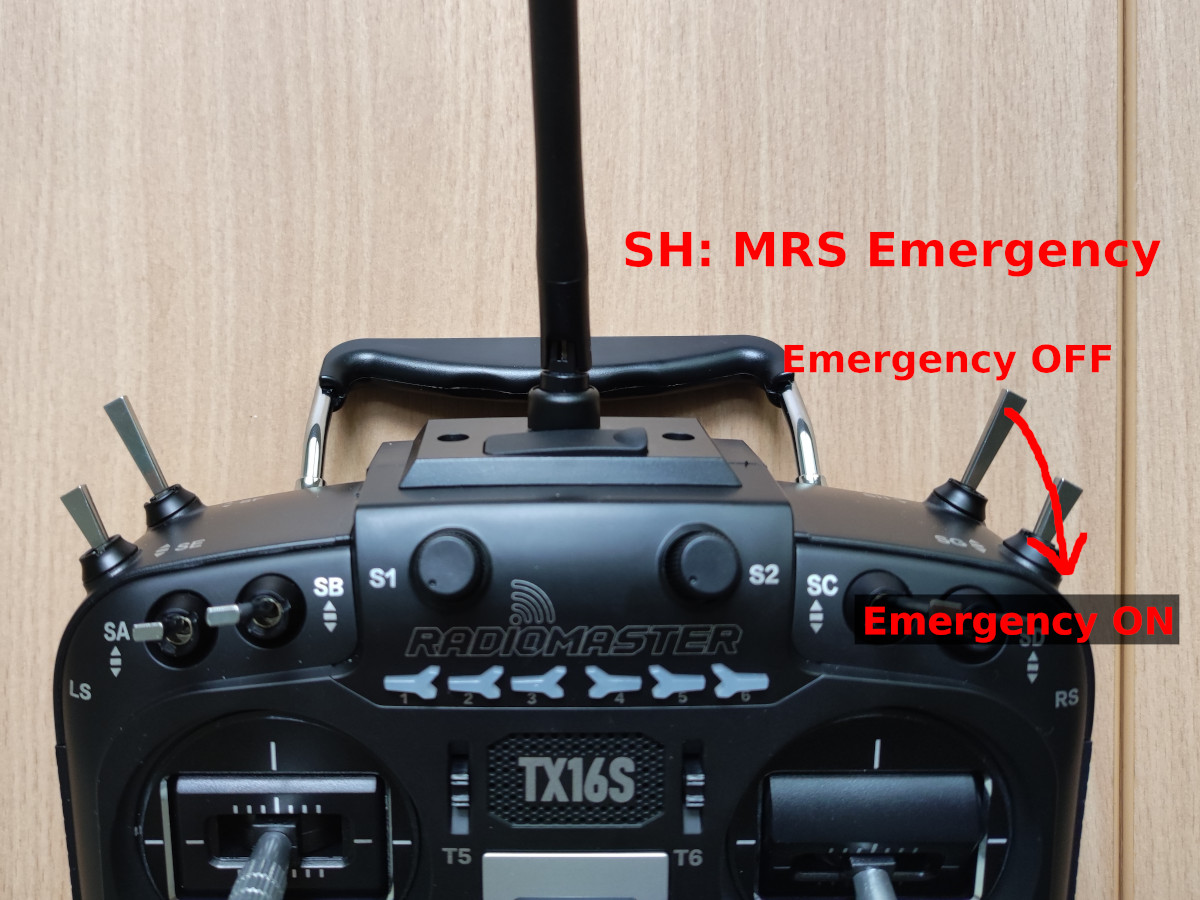
Example config for RadioMaster TX16S:
- CH5 -> SB
- CH6 -> SC
- CH7 -> SD
- CH8 -> SH
-
Now in the Radio tab in QGroundControl, select the appropriate Mode in the top right, and Calibrate the RC, following the instructions from QGroundControl.
-
Continue to Flight Modes setup:
-
Set Mode Channel to Channel 6, and set the 3 switch positions for Manual->Altitude->Position
-
Set the Offboard switch channel to Channel 5
Power tab
- Connect the battery to the UAV, so that we can read out and calibrate the Voltage.
- Set up the Number of Cells according to the used battery, usually 6 or 4. Reboot to apply changes.
- Set the empty voltage to 3.6, full voltage to 4.05 (this can be different for different batteries, mostly important for UAVS which do not use the MRS UAV System).
- Next to the Voltage divider value, click on Calculate. The measured vehicle voltage will show up, check that the value is correct with an external voltmeter. If the values differ, you can input the correct measured voltage, hit Calculate, reboot the vehicle and check again that the reading is correct.
- We do not calibrate the current as of now.
- If your ESCs cannot use DSHOT (like the M690 UAV) we need to calibrate the ESCs. Hit the Calibrate button and follow instructions.
Actuators tab (not applicable for older FW versions)
- Switch to the PWM MAIN tab, and hit Identify & Assign motors, follow the instructions.
- Once the motors are assigned, check with the actuator testing utility (bottom left) that the correct motors are spinning and that their direction is correct.
- If the direction is not correct, do not use the direction changing utility in QGround, either swap the ESC wires around, or change the settings directly in the ESC.
Safety tab
- The default MRS UAV System setup is as follows:
- Low Battery Failsafe -> Warning
- RC Loss Failsafe -> Land Mode
- Return to Launch Settings -> 10.0m, Land Immediately
- everything else should be kept on default
- These settings can be different in some manual-only UAVs.
PID Tuning, Flight Behavior, Camera -> Skip these
Parameters
See the list of parameters that have to be configured here: PX4 parameters
Verify that the RC failsafe works:
- Turn off the RC, QGroundControl should report "Manual Control Lost", when you turn on the RC, you should see "Manual Control Regained". If you see these messages, the RC failsafe works.
Now, copy the correct SD card config to the SD card of the Pixhawk, it should be in the root directory of the SD card, in a folder called "etc". You can find the up-to-date configs here. Select according to your Pixhawk version.
Final check: try arming the UAV with the RC (press safety button first). All the motors should spin, you can try changing the modes and increase the throttle.