BLHeli32
Setup for a new UAV:
- After connecting and reading the setup, click Flash BLHeli
- Select the newest possible firmware version and flash it (32.9 is the newest version during the time of writing - 22.12.2022).
- After the firmware is flashed, apply the MRS config for the motors (ESC Setup - Read setup from ini file):
-
Quad
-
Octa
- After the ini file is loaded, click Write setup
- Modify the motor spin direction if necessary
If you never programmed an ESC:
- Download BLHeliSuite32: https://github.com/bitdump/BLHeli/releases
- Create a BLHeli programmer from Arduino Nano:
- connect Arduino nano to your computer, run BLHeliSuite32
- Select Make interfaces on the top bar
- Select your Arduino model (e.g. Nano w/ ATmega328 (old Bootloader))
- Select Arduino BLHeli Bootloader
- Select the correct serial port on the bottom
- Click the Arduino BLHeli Bootloader button, a dialog box will show up, confirm it
- You should see "Arduino flashed successfully"
- Connect the ESC to the Arduino (signal to pin D3, GND to GND).
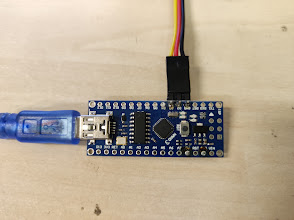
- Power up the ESC (e.g. connect a battery to the UAV)
- On the top of BLHeli32Suite, click Select BLHeli_32 Interface and choose BLHeli32 Bootloader (USB/COM)
- Go to the ESC Setup tab, select the correct serial port on the bottom and click Read Setup
- The ESC settings should now be read from the ESC and displayed
- You can now modify the settings and click Write Setup to save.