Kakute H7
Kakute H7 stores PX4 parameters on its SD card, so you have to have an SD card inserted all the time!
Kakute H7 does not have an internal magnetometer
Bootloader flashing
Kakute H7 comes with BLheli bootloader, we need to reflash it to PX4 bootloader Get the bootloader here: holybro_kakuteh7_bootloader.hex
You need to use older version of Betaflight Configurator, otherwise you will get an error.
Version 10.7.2 is verified and working.
Download here - https://github.com/betaflight/betaflight-configurator/releases/tag/10.7.2
Follow the guide here: https://docs.px4.io/main/en/advanced_config/bootloader_update_from_betaflight.html to flash the PX4 bootloader using the betaflight configurator.
PX4 firmware
You have to flash the bootloader first, otherwise these steps will not work!
Firmware - 1.14.4: https://github.com/fly4future/px4_firmware_robofly - This is a custom version with backported sensor drivers for the Kakute H7 v1.5 boards.
- Get the firmware binary here: https://drive.google.com/file/d/1o1zQO2uZoPj20DjGUjoIPO9F8v1gxN2A/view?usp=drive_link
Before loading the px4 firmware, you need to flash the bootloader first.
Use QGroundControl to flash the Firmware.
Once flashed, you have to apply these parameters through QgroundControl:
- Set the airframe to generic quadcopter -> restart
- BAT1_A_PER_V: 59.5
- BAT1_V_DIV: 11.2 - these 2 params will make the battery voltage readout work
- CBRK_SUPPLY_CHK: 894281 - this will fix the "avionics power low" error
- IMU_GYRO_RATEMAX: 400Hz - this will fix low rate of mavros messages is ROS
- SYS_HAS_MAG: 1 - this will enable magnetometer (if you use GPS)
- EKF2_MAG_TYPE: Automatic - this will enable magnetometer (if you use GPS)
- CAL_MAG0_ROT: Pitch 180°, Yaw 270° - this will fix the "strong magnetic interference" error and correct the orientation estimate (if you use GPS)
Reboot the vehicle and continue with the setup:
- calibrate all sensors, Radio, and setup flight modes
- In Power, set 4 cells and check that voltage readout works
- In Actuators, setup all motors to Dshot 300, and configure the frame shape
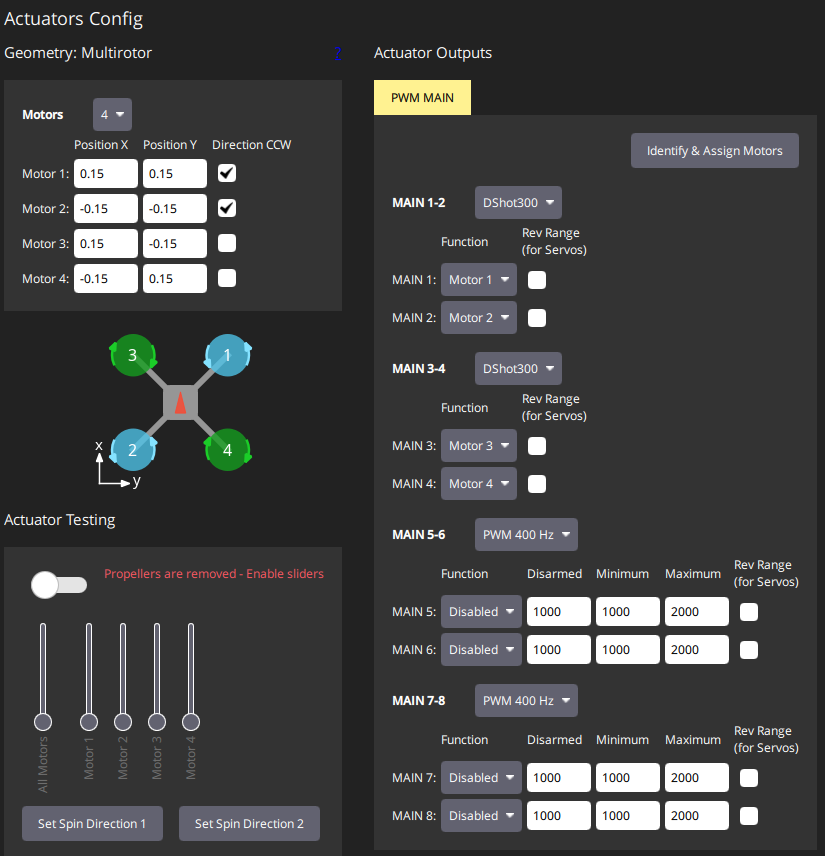
- In PID tuning, reduce the rate gain K for roll and pitch to 0.7, and Attitude P gains for roll and pitch to 6
Problem with missing magnetometer data
- On one kakute H7 1.5, problem with missing mag data was fixed by removing the usleep delay on the SD card config.
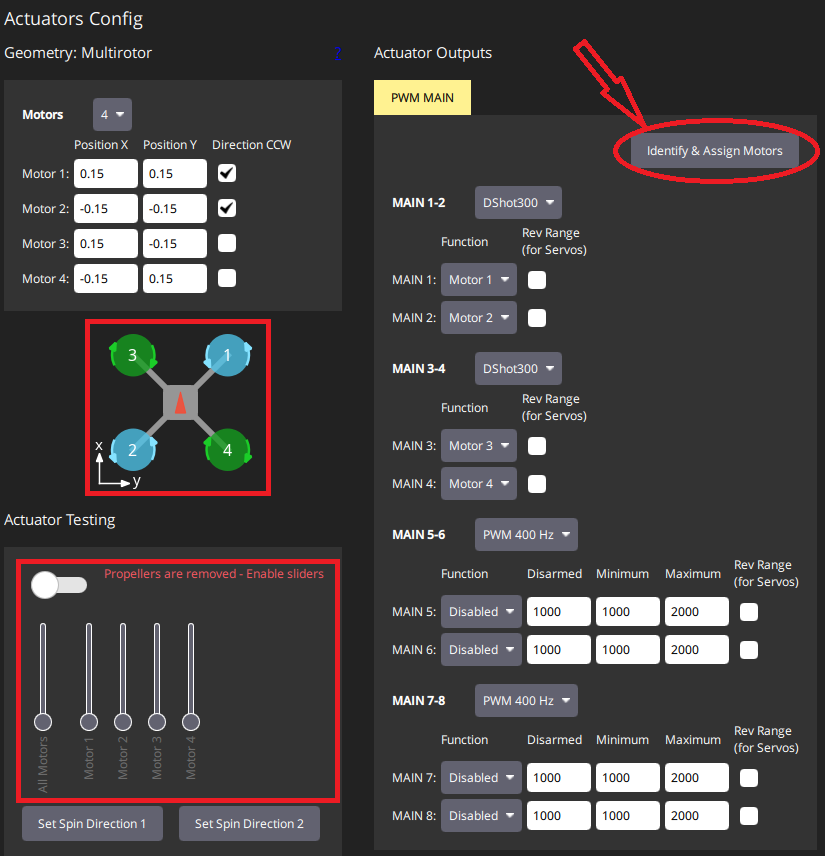
Changing the number or direction of motors.
-
In QgroundControl program, stay in actuators config
-
Press identify and assign motors button
-
See the drawing with the motor numbers and where should they rotate (left/right)
-
Confirm that the motors have the right number and rotation by enableing sliders and using the to see to number and direction of motor
Building the bootloader yourself (advanced, not needed for RoboFly):
- Clone the px4_firmware repo and in its root directory
- call:
make holybro_kakuteh7_bootloader - A build directory will be created, and the bootloader will be in build/holybro_kakuteh7_bootloader.
- You need to convert the .elf binary to .hex: `arm-none-eabi-objcopy -O ihex ./holybro_kakuteh7_bootloader.elf holybro_kakuteh7_bootloader.hex
Compiling the firmware yourself (advanced, not needed for RoboFly):
- Clone the px4_firmware repo and in its root directory, call:
- call:
make holybro_kakuteh7_default - A build folder will be created with you firmware
To get Mavlink working both ways on T3/R3 (ttyS2 on sd card):
firmware/boards/holybro/kakuteh7/nuttx-config/nsh/defconfig:
- remove line:
nuttx-config/nsh/defconfig:212:CONFIG_USART3_SERIAL_CONSOLE=y - compile and load the FW, now Mavlink should run on R3/T3 both ways!