System Install
The F4F Setup Utility provides an interactive menu to install all core software. This page covers the installation steps available under the utility's menu.
Running the Setup Utility
cd ~/git/install_script
./setup_utility_F4F.sh
The utility presents a whiptail-based menu. On first run it will:
- Check for an internet connection
- Run
sudo apt update - Install
gitif not present - Pull the latest version of the install_script repository
If there is no internet connection, the utility will warn you but still allow running configuration scripts that don't require downloads.
Menu Options
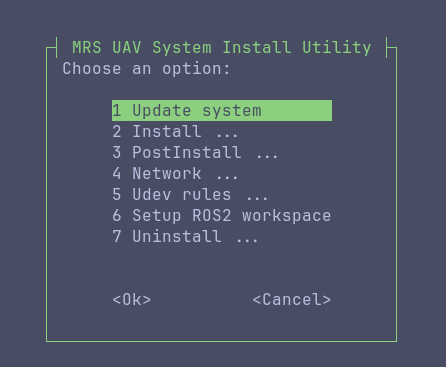
1. Update System
Runs a full system update (apt update && apt upgrade). Run this first on a fresh install.
2. Install (submenu)
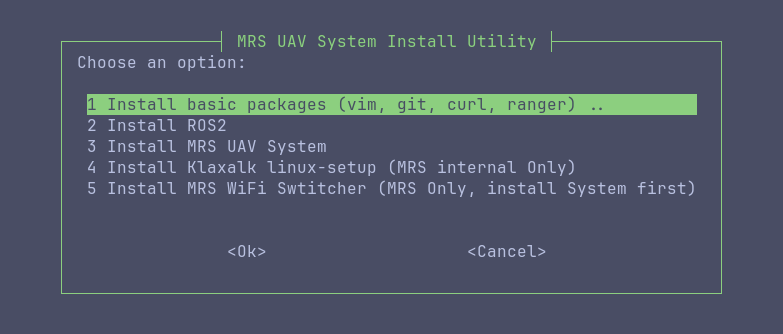
This submenu contains the core installation steps:
2.1 Install Basic Packages
Installs essential tools: vim, git, curl, ranger, and other common utilities needed for development and system administration.
2.2 Install ROS2
Installs ROS2 Jazzy and its dependencies. This sets up the ROS2 environment that the MRS UAV System builds on.
2.3 Install MRS UAV System
Installs the MRS UAV System packages. After installation, you will have:
- The MRS UAV System packages installed system-wide
- A
gitfolder in the home directory containing basic packages (notablymrs_uav_deployment) - A ROS workspace called
workspacewith essential packages
Run steps 2.1 through 2.3 in order for a fresh install. Each step depends on the previous one completing successfully.
- Don't to install the MRS Only options (Linux-setup and Wifi switcher) on UAVs for F4F customers, but they can be installed for internal use.