General recommendations
- Pull often
- Rebase frequently to avoid large conflicts
- Never commit secrets
- Never commit generated files unless required
- Delete branches after merge
- Prefer clarity over cleverness
History management
- Branches are rebased before merge to
main/master- See for example this video on what rebase is:
- Examples are available in Git Advance Tricks Examples
- Branches may be merged with
--no-ffto preserve context- Merge commit will be everytime created
- Commit history should tell a clear story
- Squashing commits before opening a PR helps to keep the commit history clean and focused.
- It allows you to group related changes together, making it easier for reviewers to understand the purpose of the changes and the overall context of the PR.
- This practice can also help to reduce noise in the commit history, especially when there are multiple small commits that may not be meaningful on their own.
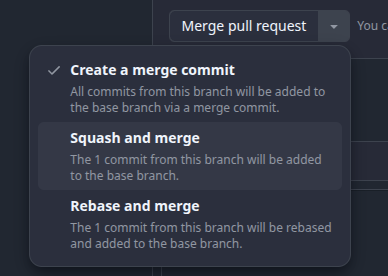
On GitHub, you can easily squash commits when merging a PR by selecting the Squash and merge option:
Keeping Local Branches Up-to-Date and the Potential Issues of Rebasing
Before rebasing, it's crucial to keep your local branches up-to-date. To do this, first fetch the latest changes from the remote repository, then switch to the branch you intend to rebase and pull the latest updates:
git fetch origin
git checkout feature/your-branch-name
git pull origin feature/your-branch-name
This ensures that your branch has the latest changes, minimizing the chance of conflicts during the rebase.
Potential Issues with Rebasing
Rebasing can help keep a clean and linear commit history, but it also introduces certain risks, especially when multiple people are working on the same branch. Rebasing rewrites commit history, which means that after a rebase, you need to force push the branch to update it on the remote repository:
git push -f origin my-branch-name
Force pushing can be disruptive because it overwrites the branch history, which may impact others working on the same branch. Always communicate with your team before performing a rebase, especially on shared branches. This will prevent unexpected issues, like overwritten changes, that could affect others' work.
Important Warnings
-
Triple-Check Before Force Push: Always triple-check the branch name, commit history, and differences before executing a force push. Mistakes during this step could lead to significant loss of work due to overwritten changes. This is one of the most critical aspects of working with
git rebase. -
Save Files During Merge Conflicts: When performing a rebase with merge conflicts, make sure to save any modified files, before continuing with:
git rebase --continueFailing to save changes can result in incomplete conflict resolutions being mistakenly added to the commit history, often indicated by leftover markers like
<<<<<<< HEAD. This could cause issues later during testing or deployment.
Additional Best Practices
-
Avoid Rebasing Shared Branches Without Coordination: If you're working on a shared branch, avoid rebasing unless absolutely necessary and after informing your team. Instead, consider merging with proper commit messages if the branch is actively used by multiple developers.
-
Verify Rebase with Logs: Always verify the commit history after rebasing using:
git log --oneline -30 | catThis will allow you to check the most recent commits to confirm that the rebase was successful and no unexpected changes were introduced.